
A Home Assistant controller can be a sensible purchase, but it is not the first answer to “I want a smart home.” Start with one household action that repeats, one device that can perform it within its own instructions, and one manual fallback. If you cannot name that first job, a controller will organize uncertainty rather than remove it.
One exception is a home that already has a functioning wired DSC panel and zones: that is not a “buy a first sensor” question. Before adding a new controller or replacing individual devices, compare the Envisalink and Konnected paths for reusing a wired DSC alarm in Home Assistant. Keep the existing panel, zone compatibility, backup behavior, and any monitoring requirement separate from ordinary room-automation decisions.
Another exception is a home where the first defined job is local temperature control, the HVAC system is documented low-voltage, and a compatible Z-Wave controller is already in place. That is not a reason to buy a controller first or to assume every thermostat fits: use the Home Assistant Z-Wave thermostat compatibility check before choosing a replacement.
Quick answer
Start with a controller when you already have several compatible devices, a reason to coordinate them, and a willingness to maintain a local system. Start with one task-first device when the household still needs to prove that a routine is worth automating.
Choose by the amount of coordination you actually need
| Current reality | Start with | Verify before buying |
|---|---|---|
| One lamp, fan, or curtain creates a repeated daily chore | One task-first device | Physical fit, instructions, manual fallback, and whether the routine repeats. |
| Several existing devices need rules that depend on each other | A controller evaluation | Compatibility, network location, maintenance willingness, and the exact hardware path. |
| You only like the idea of a dashboard | Pause | Whether it removes a recurring task rather than adding setup work. |
| You expect local control to solve every device problem | Check each device separately | Its supported integration, account path, radio requirements, and manual operation. |
Use the first-task test
- Write one action that repeats without a dashboard: turn on a compatible lamp, close one compatible curtain, or another specific task.
- Check whether it can be done safely and manually when the network or app is unavailable.
- Run that one task long enough to learn whether timing, device coordination, or observation is the real missing layer.
- Only then decide whether several devices now need a shared controller and maintenance routine.
Two first-task paths to inspect
Disclosure: As an Amazon Associate I may earn from qualifying purchases. Prices, stock, and delivery terms can change — please confirm the current details on Amazon before ordering.
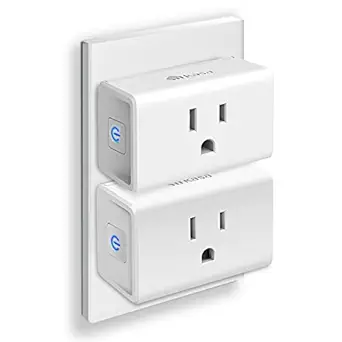
Choose this first only when one compatible lamp or fan has a repeated on-off routine you can name and test manually.
Kasa EP10P2 Smart Plug (2-Pack)
$13.96 $16.99

Choose this only when opening or closing a compatible curtain is a recurring physical task and the curtain geometry has been checked.
SwitchBot Curtain Opener
$69.99
When a controller becomes the better next step
A controller earns its place after multiple devices need a shared rule, a shared view, or a local coordination path that individual apps cannot provide. Home Assistant documents that Green is designed as an easy hardware entry point and that compatible radios may need additional hardware. Treat this as a compatibility and maintenance decision, not evidence that every smart device should be replaced or centralized immediately.
FAQ
- Q: Do I need Home Assistant before buying any smart device?
A: No. First prove one repeated job and preserve a manual fallback. Evaluate a controller when several devices need coordination. - Q: Does Home Assistant Green include every required radio?
A: Do not assume so. Check the official compatibility and accessory documentation for the devices you plan to use. - Q: Can a smart plug automate any appliance?
A: No. Use only with an appropriate device and follow both products’ instructions.
When a first automation task needs three separately controlled plug-in devices rather than one smart plug, inspect this Kasa KP303 Smart Power Strip for Three Separate Desk or Home-Office Routines.
To decide the first physical device path before committing to a controller, begin with Smart dimmer vs smart plug: choose the first lighting routine.